Integrating Shopify with QuickBooks is one of the most effective ways to simplify ecommerce accounting. However, without the right setup, you’ll end up fighting the same problems automation is meant to solve: manual data entry, sync delays, and mismatched records that skew your financial records.
Shopify handles your sales, and QuickBooks tracks your money. The real challenge is getting them to talk to each other reliably. Not every integration works the same way, and choosing the wrong one can lead to duplicate transactions, missing payouts, and tax discrepancies.
This guide covers connecting Shopify and QuickBooks, including key methods, common pitfalls, and tips for accurate real-time data.
Does Shopify Integrate Directly with QuickBooks?
Shopify doesn’t offer a direct QuickBooks integration. To connect the two platforms, you’ll need an app or connector that automates the data flow between them and reduces the need for manual updates.
What Integration Really Means for Ecommerce Accounting
Integration simply means your systems share data automatically. When someone buys from your Shopify store, that information flows into QuickBooks without manual intervention. Orders, customers, payments, taxes, shipping fees, and inventory all transfer between systems.
Why does this matter for your business?
- Financial accuracy becomes automatic instead of aspirational.
- Tax compliance happens without digging through spreadsheets.
- Cash flow visibility updates in real-time, not weekly.
- Administrative time drops from hours to minutes.

When integration works properly, you gain capabilities that manual processes can’t match. You instantly see best-selling products, inventory stays accurate across platforms, and month-end books close in minutes rather than days.
Here’s what that looks like in real life:
Earth’s Treasury, which processes over 1,000 monthly orders across Shopify and WooCommerce, eliminated manual QuickBooks entry entirely through proper integration. That’s the difference automation makes.

Your 3 Shopify-QuickBooks Integration Options (And Why Most Fall Short)
Here are the three main ways to connect Shopify with QuickBooks, and what to watch out for with each. Understanding these options helps you avoid costly mistakes and choose the right setup for your business stage.
1. Manual Entry: Full Control, Full Time Commitment
Manual entry gives you complete control over how transactions appear in QuickBooks—but it quickly becomes unmanageable as order volume grows. Exporting CSVs from Shopify, reformatting them for QuickBooks, adjusting taxes, and double-checking SKUs all take time and invite human error.

Studies show manual data entry has a 1–5% error rate, meaning up to 60 mistakes per year for stores processing 100 monthly orders. Even small errors can cause major discrepancies in inventory or tax reporting.
Best for: very small stores (fewer than 10 monthly orders). Even at this level, automation tools like MyWorks offer a free plan that eliminates manual work.
2. Built for Shopify Apps: Native Management with Mixed Results
Shopify doesn’t include its own QuickBooks connector, but apps with Built for Shopify status integrate directly within your Shopify admin. Here are the clear advantages of Built for Shopify apps:
- Seamless setup and automatic compatibility with Shopify updates.
- Quick installation (usually under 30 minutes).
- Support from teams familiar with Shopify’s ecosystem.
If you need a simple, reliable sync within Shopify’s ecosystem, choosing a Built for Shopify app is a no-brainer. MyWorks bridges the gap between Shopify and accounting and is both Built for Shopify and an Intuit Platinum Partner, the only integration tool holding both credentials.

3. Other Integration Options: Complexity and Limitations
Another popular way to integrate Shopify and QuickBooks is using an action-based tool like Make or Zapier. While these tools are great for simple automations, they’re a poor fit for the complexity of ecommerce accounting automation.
Zapier and Make fire one task per trigger, which struggles with accounting realities like multi-component payouts, refunds, post-checkout order edits, tax mapping, inventory levels, and safe, duplicate-proof posting at scale.
When using such connectors you end up maintaining brittle workflows instead of getting clean, balanced entries your accountant can reconcile. Moreover, setup can be incredibly time-consuming and costs quickly add up when you start adding customizations.
For a reliable setup, use an ecommerce-native integration that supports two-way inventory, flexible posting (individual orders or daily summaries), deep mappings for taxes/fees/classes, error logs, and historical sync, like MyWorks for Shopify + QuickBooks.

Comparison: Manual vs. Built for Shopify vs. External Tools
Here’s how each integration option compares at a glance:
| Aspect | Manual Entry | ‘Built for Shopify’ app (MyWorks) | Other Tools (Action-based automations) |
| Setup Time | None | ~30 minutes | Multiple hours |
| Cost | Your time (8+ hrs/month) | Free to ~$100/month | $30–$1,000+ |
| Sync Speed | None (manual) | Near real-time | 15 min – daily |
| Transaction Detail | Full control | Flexible (orders, summaries, invoices) | Limited |
| Payment Support | All, entered manually | All major gateways | Sometimes limited |
| Scalability | Not practical long-term | Scales with business growth | Can slow or break at volume |
| Best For | <10 monthly orders | Most ecommerce businesses | Very few specialized use cases |
MyWorks: The Complete Shopify-QuickBooks Integration Solution
MyWorks eliminates the complexity that frustrates growing Shopify businesses. It’s both Built for Shopify and an Intuit Platinum Partner, delivering seamless, real-time syncing between your storefront and accounting system, all from within your Shopify admin.
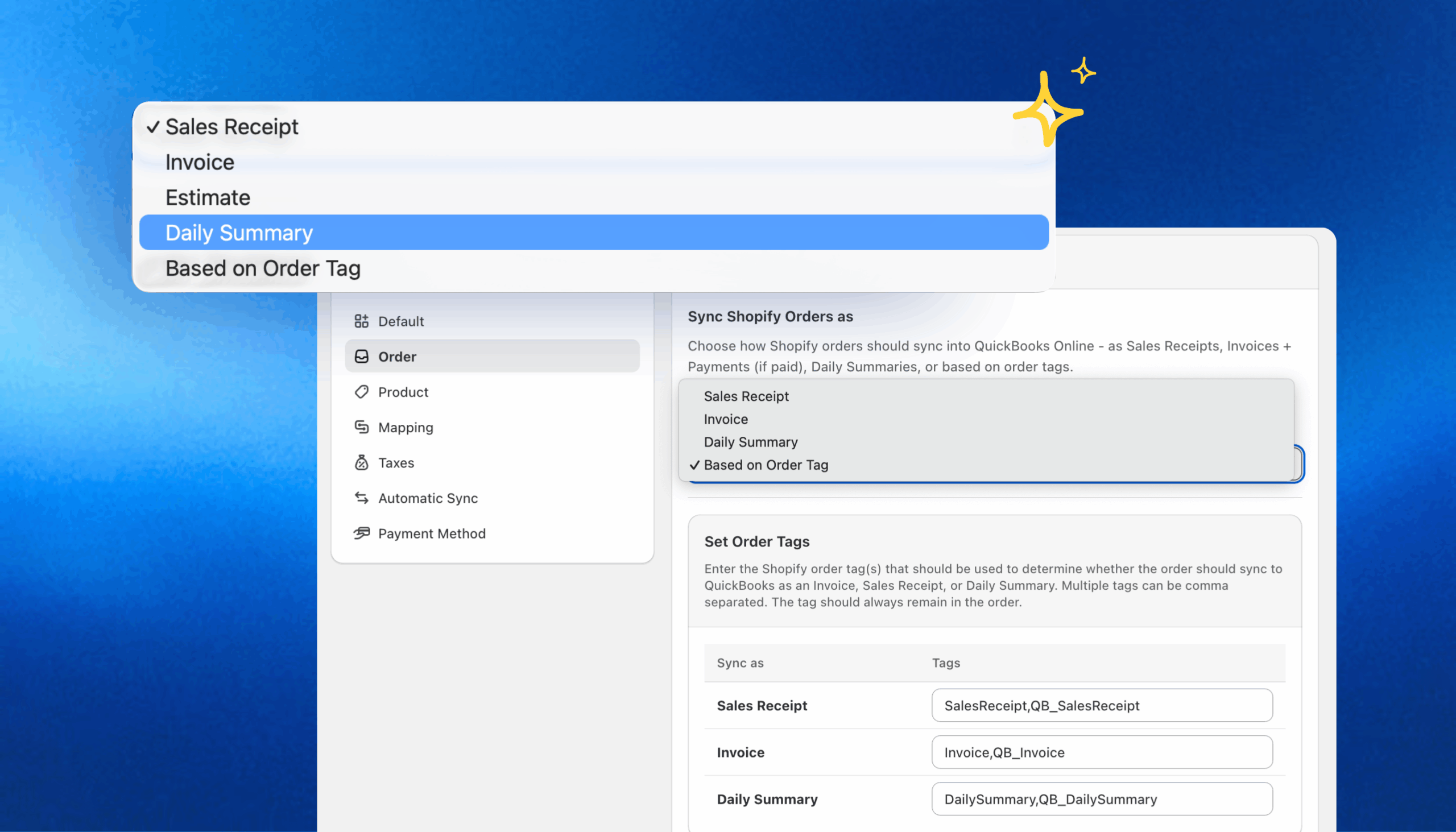
Flexible sync options adapt to any workflow:
- Sync retail orders as sales receipts, wholesale as invoices, or use Daily Summaries for high-volume transactions.
- Create hybrid setups (e.g., B2C orders in bulk summaries, B2B orders individually).
Why it stands out:
- Real-time or five-minute sync intervals
- Support for all major payment gateways
- Automatic compatibility with Shopify updates
- Pricing that scales: free for small stores, affordable tiers for higher volumes
Start Syncing Shopify and QuickBooks Today
Thousands of merchants use MyWorks to simplify bookkeeping with their Shopify–QuickBooks sync, so you can focus on growth, not spreadsheets.
Explore MyWorks pricing and start your free trial.
Frequently Asked Questions About Shopify and QuickBooks Integration
1. How Do I Sync Shopify With QuickBooks?
To sync Shopify with QuickBooks, follow these three main steps:
- Choose an integration app that fits your order volume and accounting workflow.
- Connect your accounts through the app’s setup wizard (typically a 30-minute process).
- Configure your sync preferences, such as how transactions post as sales receipts, invoices, estimates, or daily summaries.
Once connected, Built for Shopify apps like MyWorks handle synchronization automatically in real time. You can even mix sync types based on Shopify order tags, for example, syncing B2C sales as daily summaries while posting B2B orders individually.
2. How Do I Record Shopify Sales in QuickBooks?
You can record Shopify sales in QuickBooks in a few different ways, depending on your business model:
- Sales Receipts: for DTC or retail orders paid at checkout; keeps your books and deposits in sync.
- Invoices: for wholesale or B2B customers who pay later; tracks outstanding balances accurately.
- Estimates: for pre-orders or custom products; logs expected revenue before payment.
- Daily Summaries: for high-volume stores; posts one consolidated entry per day to simplify reconciliation.
- Hybrid Sync (MyWorks only): combine any of the above using Shopify order tags. For instance, sync most orders as daily summaries but post wholesale orders individually.
MyWorks is currently the only Shopify integration that supports all these sync modes within Shopify.
3. What Accounting Software Does Shopify Work With?
Shopify connects to several accounting platforms, including QuickBooks Online, QuickBooks Desktop, Xero, Sage, NetSuite, and FreshBooks, through third-party apps. However, QuickBooks Online remains the most widely used among Shopify merchants due to its ecommerce-friendly reporting and integrations. When evaluating integration tools, prioritize apps that are built for Shopify and officially recognized partners of your accounting platform. This ensures full compatibility, real-time data sync, and dependable long-term support.
4. Does Shopify Have a QuickBooks Integration?
Shopify doesn’t develop its own QuickBooks integration, but the Shopify App Store offers several third-party options. QuickBooks (Intuit) provides its own connector, though it currently supports only Shopify Payments and lacks flexibility for other gateways like PayPal or Stripe. The best alternative is an integration that’s both Built for Shopify and an Intuit Platinum Partner: a combination only MyWorks offers.