




Ecommerce returns are one of the most common and most expensive sources of accounting errors. That refund you processed in Shopify? If it didn’t sync properly to QuickBooks, your revenue is wrong, your inventory is off, and your month-end reconciliation won’t balance.
The problem goes deeper than a single missed transaction. Every ecommerce return affects multiple financial records at once: revenue, cost of goods sold (COGS), and inventory. When even one of these updates incorrectly, your profit reports become unreliable, while the errors compound as your order volume grows.

With U.S. retail returns totaling hundreds of billions of dollars annually and ecommerce return rates often exceeding 20%, this isn’t a fringe bookkeeping issue. It’s a structural data problem, especially for Shopify sellers relying on generic QuickBooks refund integrations.
In this guide, we’ll explain why ecommerce returns create accounting problems, where most Shopify–QuickBooks setups fall short, and how proper ecommerce returns management keeps your books accurate without manual cleanup.
TL;DR: Why Returns Break Your Books
| The Problem | What Happens | The Impact |
|---|---|---|
| Refunds don’t sync. | Shopify processes the return, but QuickBooks never sees it. | Overstated revenue, incorrect tax liability. |
| Inventory mismatches. | Items restocked in Shopify, but not QuickBooks. | Wrong COGS, phantom stock. |
| Partial returns ignored. | Only full-refund logic exists. | Revenue and inventory are both wrong. |
| Fee adjustments missed. | Processing fees aren’t reversed correctly. | Reconciliation headaches. |
Why Ecommerce Returns Cause Accounting Errors
Returns aren’t just logistical headaches. They create a chain reaction across your financial data. Every return touches at least three areas: revenue, cost of goods sold, and inventory. When any of these fail to update, your books drift further from reality.
Here’s how returns should flow through your ecommerce accounting, and where that process often breaks.
1. Revenue Adjustments: Reversing Sales, Taxes, and Payouts
When a customer returns an item, you’ve refunded money you previously recorded as revenue. That sale needs to be reversed in QuickBooks. If it doesn’t, your income statement shows earnings you no longer have, your sales tax liability is inflated, and your profit margins are wrong. This is how discrepancies snowball into audit risks.

2. COGS Corrections: Restoring True Gross Margin After a Return
When you sold the product, its cost was recorded as an expense. When that product returns to inventory, the cost needs to be reversed as well. If this doesn’t happen, your gross margins are understated, and your financial reports mislead anyone making decisions from them.
3. Inventory Restocking: Keeping Stock Levels in Sync Across Systems
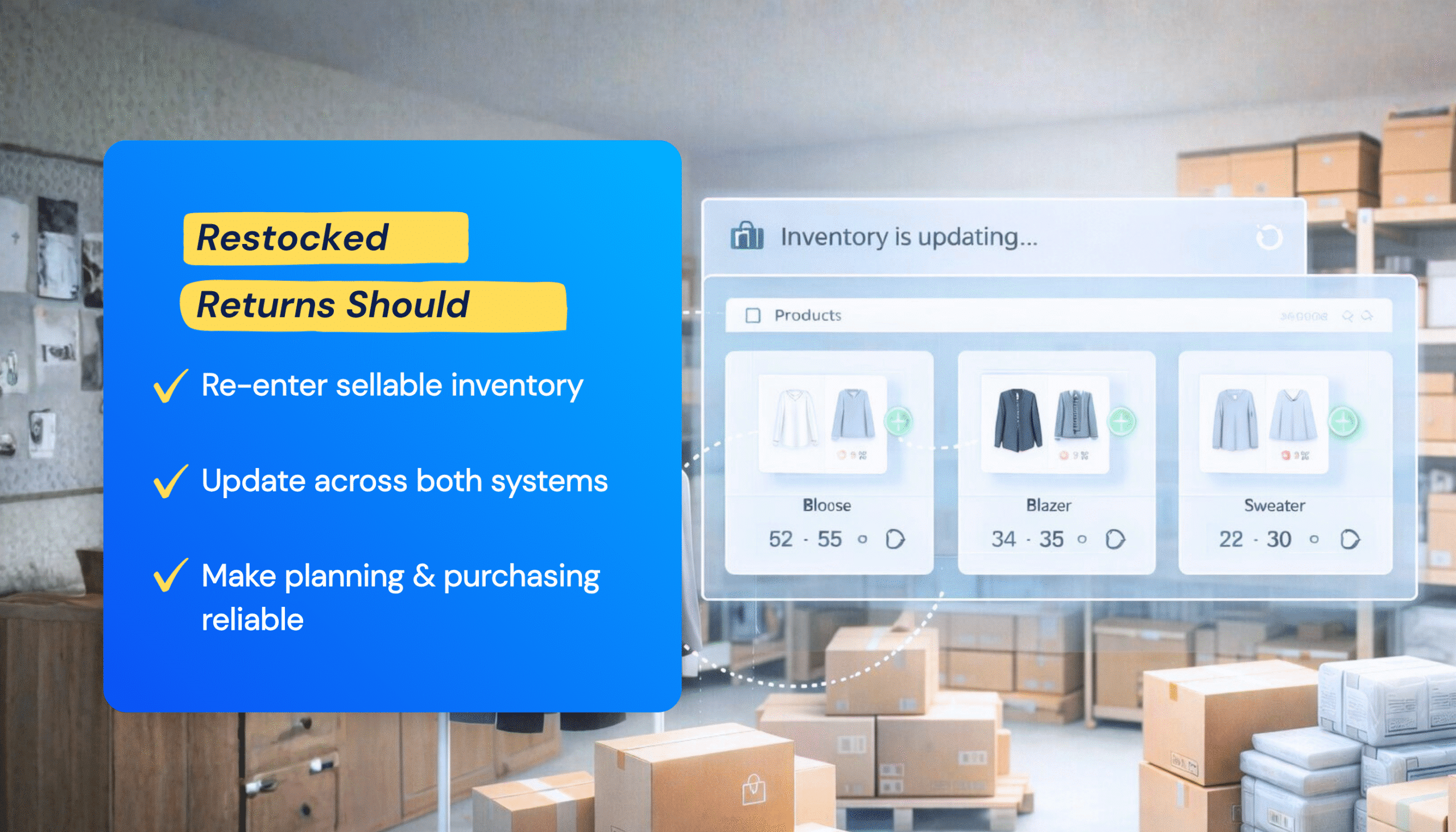
Many returned products go back into sellable inventory. Your stock counts need to update in both Shopify and QuickBooks. When they don’t, you end up with phantom inventory in one system and stockouts in the other, making demand planning and purchasing unreliable.
Related: Inventory Management Techniques for Ecommerce Businesses
Understanding why returns break your books is only half the problem. The real question is: why don’t most integrations fix it?
Where Shopify-QuickBooks Integrations Break Down
Most Shopify-to-QuickBooks integrations handle basic order syncing reasonably well. Sales get recorded, payments appear, and customers transfer over. But returns expose the limits of generic connectors.
Refunds Don’t Sync (Or Sync Incorrectly)
Many basic connectors skip refunds entirely. Others create a credit memo but fail to link it to the original transaction, leaving revenue, tax, or receivables out of balance. The result: QuickBooks still shows income that’s already been returned to the customer.

Partial Returns Get Ignored
A customer orders three items and returns one. Simple enough—unless your integration only understands full refunds. In that case, it may skip the return entirely or reverse the entire order, creating duplicate adjustments or phantom credits.
Inventory Adjustments Go Missing
Shopify marks the item as restocked. QuickBooks still shows it as sold. Now your inventory counts don’t match, your COGS is wrong for that period, and you can’t trust your stock levels when making purchasing decisions.
Fee Reversals Get Missed
When you refund an order, you don’t get your payment processing fee back, but the original fee remains on your books. Without proper adjustments, your expense tracking becomes inaccurate, and reconciling your bank account takes far longer than it should.
| Quick check: Compare your last 10 Shopify refunds with what appears in QuickBooks. If the numbers don’t match, your integration isn’t handling returns correctly. |
The good news? With a purpose-built Shopify–QuickBooks integration like MyWorks that offers full refund support, these problems disappear.
Before MyWorks vs. With MyWorks: Return Syncing in Action
The difference between broken syncing and accurate syncing shows up every time a customer asks for their money back.
Full Refunds
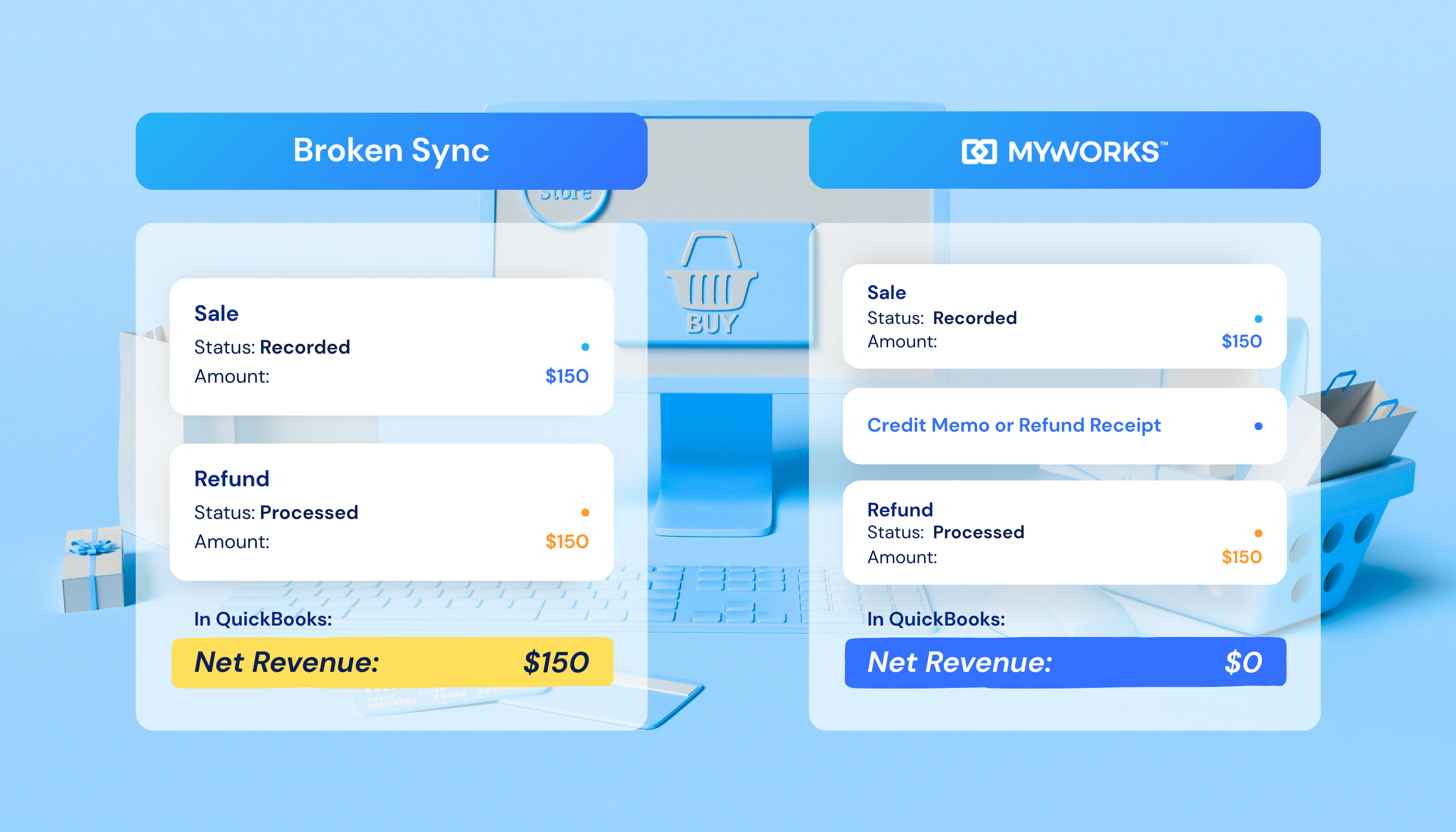
Before: A customer returns a $150 order. Shopify processes the refund. QuickBooks still shows the $150 sale. At month-end, your revenue is overstated, your reconciliation doesn’t balance, and you’re manually creating credit memos to fix it.
With MyWorks: The refund syncs automatically. MyWorks creates the correct credit memo or refund receipt in QuickBooks, linked to the original transaction. Revenue, tax, and payment records all update correctly.
Partial Returns
The problem: a customer orders a hoodie, two t-shirts, and a hat, but returns only the hoodie. Many integrations either ignore the partial refund or reverse the entire order.
With MyWorks: partial refunds sync line by line. Only the hoodie is credited. The remaining items stay recorded as sold. Inventory updates only for the returned item. Revenue, COGS, and stock counts all reflect what actually happened.
Exchanges
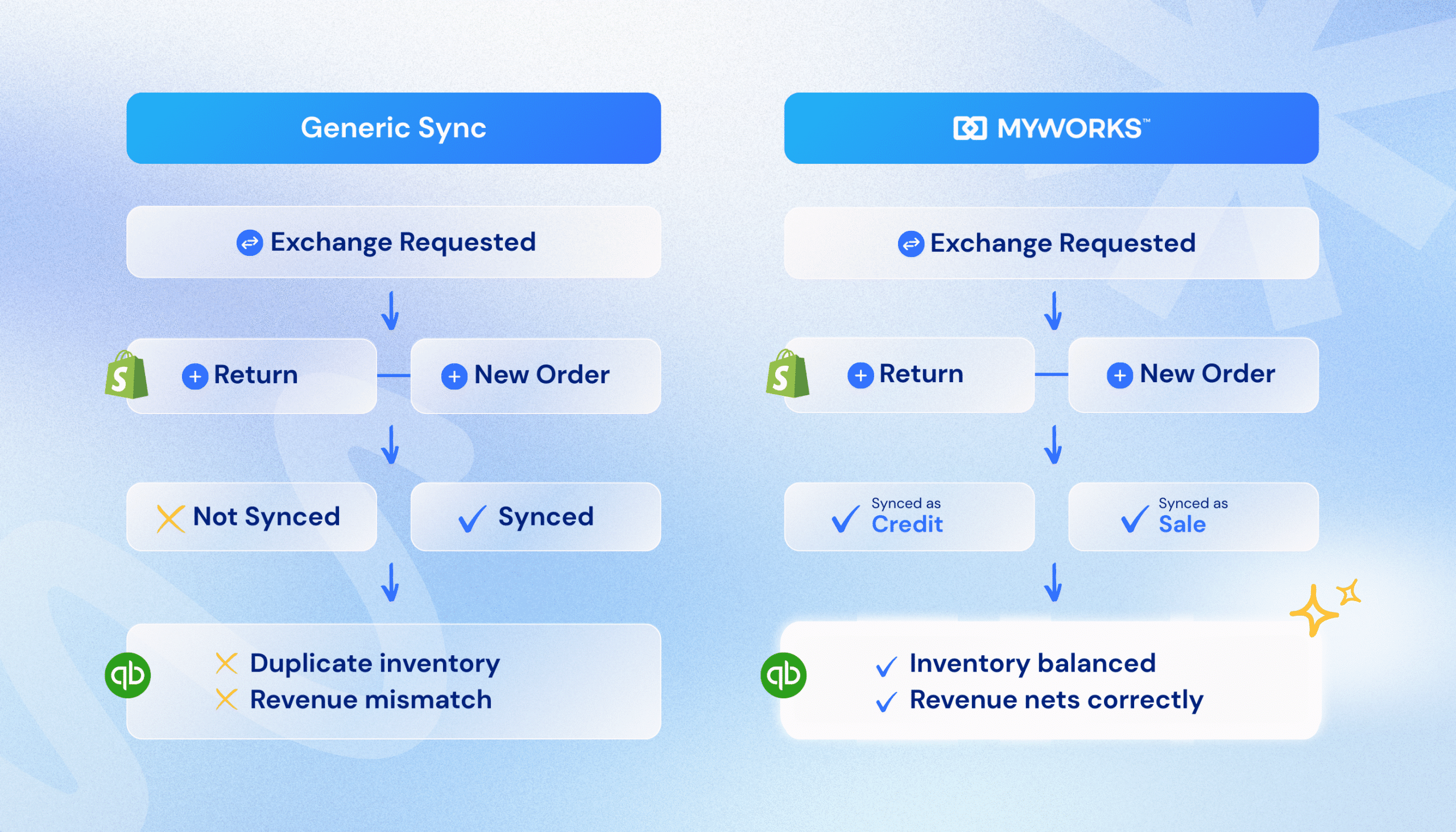
Without proper syncing: Shopify creates a return and a new order. Your integration may sync one but miss the other. Now you’ve got duplicate inventory, mismatched revenue, and reconciliation issues.
With MyWorks: the return syncs as a credit. The new order syncs as a sale. Inventory updates correctly in both directions. Your books match the real flow of products and money.
Because refunds, inventory, and fees all sync as they happen, there’s nothing to hunt down at month-end. Your QuickBooks balances match your bank statements, and your accountant doesn’t have to trace discrepancies.
Related: How to Automate Your Shopify Accounting
MyWorks: Stop Returns From Breaking Your Books
You shouldn’t need to manually fix your accounting every time a customer requests a refund. MyWorks doesn’t process your returns (Shopify handles that). But it ensures every refund, inventory adjustment, and fee reversal lands in QuickBooks exactly as it should.
As a Built for Shopify app and Intuit Platinum Partner, MyWorks integrates directly into your existing workflows and handles the complexity of ecommerce accounting, including the messy parts like partial returns and exchanges.
Book a demo to see how MyWorks keeps your Shopify and QuickBooks data accurate, even when returns happen.
FAQs About Ecommerce Returns and Accounting
1. What Are Ecommerce Returns in Accounting Terms?
In ecommerce accounting, a return isn’t just a product coming back. It’s a multi-account reversal affecting revenue, COGS, inventory, and often sales tax. When you process a return in Shopify, all three need to update in QuickBooks for your books to stay accurate. Most sync issues occur because integrations treat returns as simple refunds rather than full financial adjustments.
2. Why Don’t Shopify Returns Automatically Update in QuickBooks?
Shopify and QuickBooks are separate platforms with no native deep integration. Basic connectors often sync orders but lack the logic to handle refunds, partial returns, or inventory adjustments correctly. This creates discrepancies where Shopify shows the refund, but QuickBooks still reflects the original sale. MyWorks’ Shopify-QuickBooks sync bridges this gap by accurately syncing refunds, including line-item partial returns.
3. How Do Ecommerce Returns Affect COGS?
When you sell a product, its cost is recorded as a cost of goods sold (COGS). When it returns to inventory, that cost should reverse. If your integration doesn’t handle this, your COGS remains inflated, and your gross margins appear lower than they really are.
4. Can You Do Refunds Through QuickBooks?
Yes, but not directly from your Shopify store. QuickBooks can record refunds as credit memos or refund receipts, but it won’t automatically know when a return happens in Shopify. You either create the entry manually or use an integration like MyWorks to sync refunds automatically.
5. Can MyWorks Handle Partial Refunds and Exchanges?
Yes. MyWorks syncs refunds at the line-item level, so partial returns only adjust the specific items returned. Exchanges sync as two linked transactions: a refund for the returned item and a sale for the new item. This keeps revenue, inventory, and COGS accurate for each product in the order.
6. How Much Time Does Automating Return Syncing Save?
Merchants report saving 10–25 hours per week after automating their Shopify-QuickBooks accounting workflows. Return syncing eliminates manual credit memo creation, inventory adjustments, and manual reconciliation work, especially during high-return seasons.